Smart Heating Controls Guide
Why Is My Smart Thermostat Not Connecting to Wi-Fi?
A simple guide to smart thermostat connection problems, offline heating controls and Wi-Fi issues in North London homes.
📶
Smart Thermostat Wi-Fi Problems Can Stop Easy Heating Control
A smart thermostat needs a stable connection between the thermostat, Wi-Fi router, smart hub and heating app. When one part of that connection fails, the thermostat may appear offline, refuse to pair or keep disconnecting.
This does not always mean the thermostat is broken. The issue may be weak Wi-Fi signal, router settings, app login problems, low power, incorrect pairing or a smart hub connection fault.
VR Central Heat provides
Smart Heating Controls Services
and support for
smart heating control issues
across North London.
Whole Blog at a Glance
A quick look at why a smart thermostat may not connect to Wi-Fi or may keep going offline.
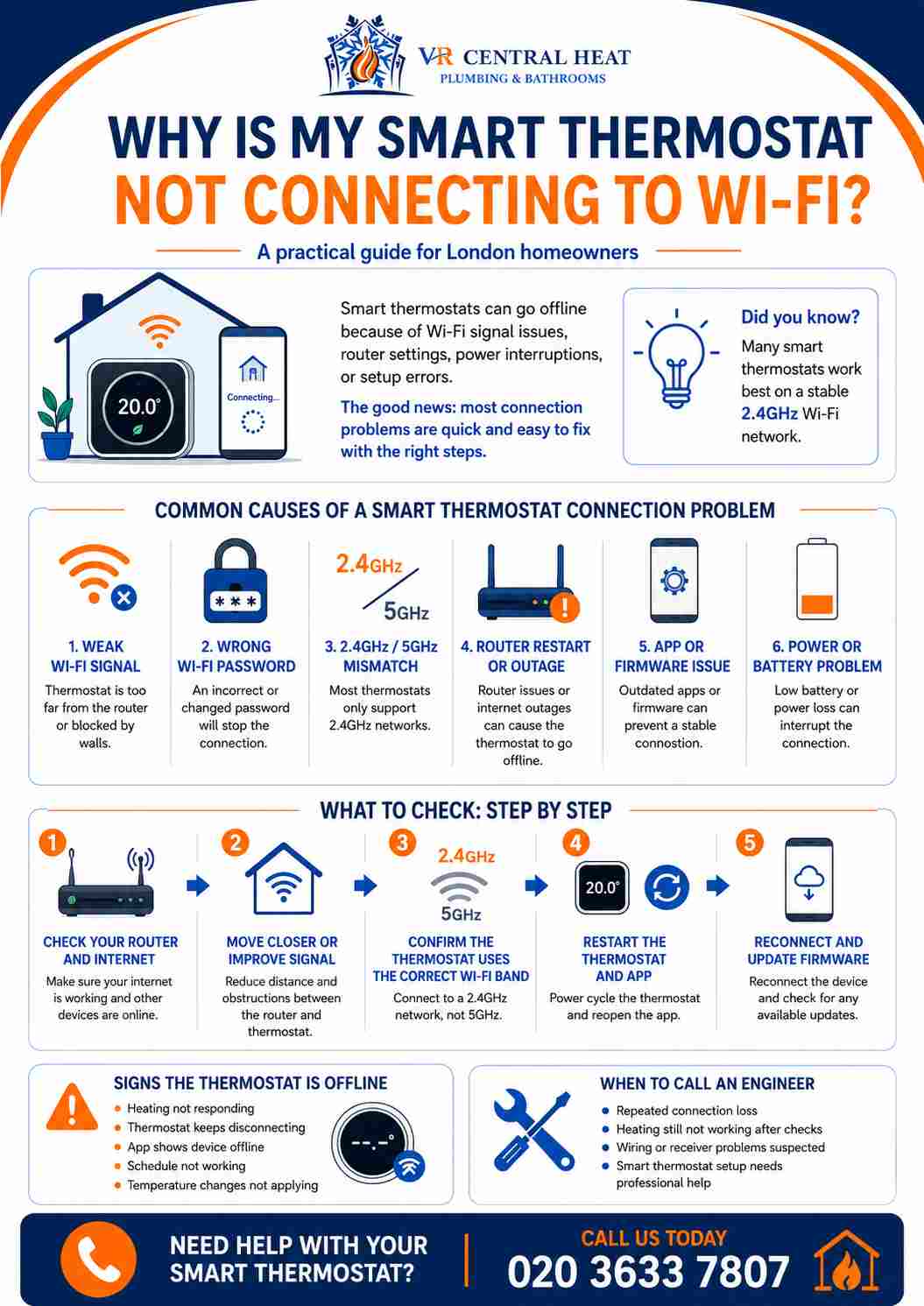
Tap or click the infographic to view it larger.
📶
1. Weak Wi-Fi Signal Can Stop the Thermostat Connecting
Smart thermostat not connecting to Wi-Fi
A smart thermostat needs a reliable Wi-Fi signal to stay connected. If the thermostat is far from the router, behind thick walls or installed in an area with poor signal, it may keep disconnecting or fail to connect during setup.
- The thermostat may show as offline in the app.
- The connection may work briefly, then drop again.
- Thick walls, cupboards and metal objects can weaken signal.
- A weak connection can affect schedules, remote control and heating alerts.
What it may mean
The thermostat may not be getting a strong enough Wi-Fi signal to stay online.
Simple check
Check the Wi-Fi signal near the thermostat using your phone in the same location.
🛜
2. Router Settings Can Block Smart Thermostat Connection
Thermostat won’t connect to Wi-Fi
Some smart thermostats are sensitive to router settings. If the Wi-Fi password has changed, the network name has been updated or the router has separate bands, the thermostat may fail to reconnect.
- The thermostat may not recognise the new Wi-Fi details.
- The device may struggle with certain network settings.
- Guest networks or restricted networks may block setup.
- Router restarts or broadband changes can knock the thermostat offline.
What it may mean
The thermostat may be trying to connect to old or unsuitable network details.
Useful step
Restart the router and thermostat, then check the Wi-Fi name and password are correct.
📱
3. Smart Hub or App Issues Can Show the Thermostat Offline
Smart thermostat offline
Many smart heating controls use an app, receiver, bridge or smart hub. If the hub loses power, the app account has a problem or the thermostat is not syncing correctly, the system may appear offline even if the thermostat is still powered.
- The app may say the thermostat is offline.
- The hub or receiver may show a warning light.
- The thermostat may not respond to app commands.
- Heating schedules may stop syncing correctly.
What it may mean
The connection problem may be with the hub, app account or heating receiver.
🔋
4. Low Power Can Make a Smart Thermostat Disconnect
Thermostat keeps disconnecting
A smart thermostat can lose connection if the battery is low, the wiring is not supplying stable power or the receiver has a power issue. When power is unstable, the thermostat may restart, lose Wi-Fi or disconnect from the app.
- The thermostat screen may go blank or restart.
- The app may show repeated offline notifications.
- Heating commands may be delayed or ignored.
- Low battery warnings should not be ignored.
What it may mean
The connection issue may be caused by low battery, wiring or receiver power problems.
🔄
5. Pairing Problems Can Leave the Thermostat Offline
Smart thermostat connection problem
If the smart thermostat was recently installed, reset or moved to a new Wi-Fi network, the setup process may not have completed properly. Incorrect pairing can stop the thermostat, receiver, app and boiler from communicating correctly.
- The thermostat may not appear in the app.
- The receiver may not respond to thermostat commands.
- The app may fail during setup or ask to pair again.
- The heating may not turn on even when the thermostat asks for heat.
What it may mean
The thermostat may need correct setup between the app, hub, receiver and heating system.
Best action
Arrange a smart heating controls check if the system will not pair or keeps dropping offline.
What Should You Check Before Calling an Engineer?
These simple checks can help identify why your smart thermostat is not connecting to Wi-Fi.
- Check that your Wi-Fi router is working normally.
- Make sure the thermostat is near enough to the Wi-Fi signal.
- Confirm the Wi-Fi name and password are correct.
- Restart the thermostat, app, router and smart hub if needed.
- Check batteries, wiring or receiver power.
- Book help if the thermostat still shows offline or keeps disconnecting.
Book Smart Heating Help
Need Help With a Smart Thermostat Connection Problem?
VR Central Heat can inspect your smart thermostat, heating receiver, hub, app setup and heating controls to help restore reliable control.
Call 020 3633 7807 for smart heating control support in North London.
View Smart Heating Controls Services
If your smart thermostat is offline, keeps disconnecting or will not connect to Wi-Fi, book
smart heating control issues
support with VR Central Heat.